From Monolithic Queues to Isolated Workflows: A Deep Dive into BullMQ-Pro’s Group Feature

Introduction: The Hidden Cost of Resource Contention in Distributed Job Systems
In modern distributed architectures – where microservices, event-driven patterns, and cloud-native workloads have become the norm – message queues serve as the foundational layer for asynchronous processing. They power the scalability, elasticity, and fault tolerance that today’s applications demand. But despite their critical role, traditional queueing models still rely on a surprisingly rigid abstraction: a queue is treated as a single, linear pipeline of work. As modern web scraping scales to larger and more distributed workloads, queue architecture becomes increasingly important for maintaining predictable performance and reliability.
This simplicity comes at a cost.
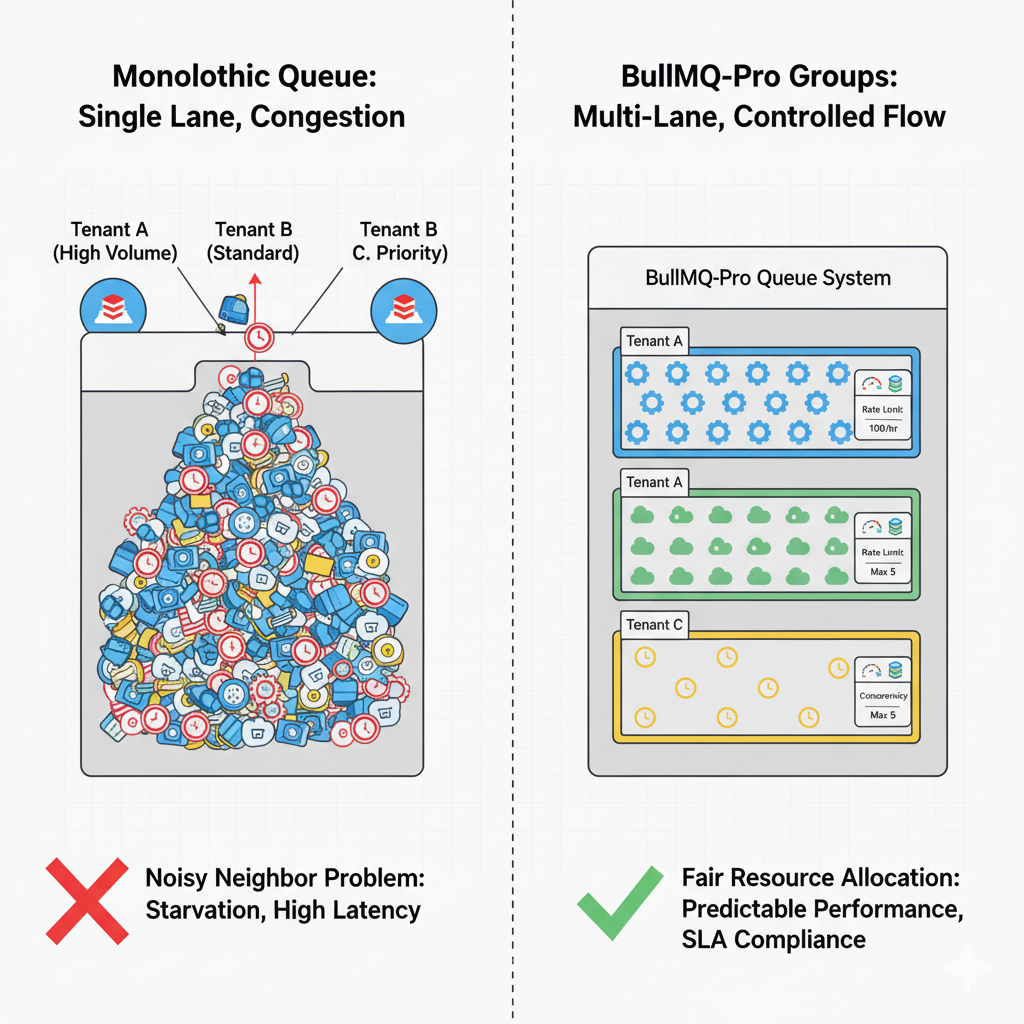
In real-world, multi-tenant environments, dozens or even hundreds of producers – representing different users, customers, or internal services – often share the same processing backend. The result is unavoidable competition for limited consumer resources. This is where the notorious “noisy neighbor” problem emerges: a sudden surge of jobs from one high-volume tenant can easily overwhelm the system, delaying or starving jobs from others. Latency spirals, SLAs erode, and operational predictability disappears.
Engineering teams are left with an unappealing choice: either over-provision and isolate queues for every tenant – driving up infrastructure and management overhead – or accept a system where fairness and performance guarantees are fundamentally unreliable.
So the question becomes: How do we deliver fair, predictable, tenant-aware processing without the operational burden of managing countless separate queues?
The answer requires rethinking the queueing paradigm itself.
The Solution: Granular Control with BullMQ-Pro Groups
BullMQ-Pro, a high-performance, Redis-based job queue system, introduces a paradigm-shifting feature to solve this exact problem: Groups. The Groups functionality allows for the logical partitioning of jobs within a single queue, enabling fine-grained control over concurrency and rate-limiting on a per-group basis.
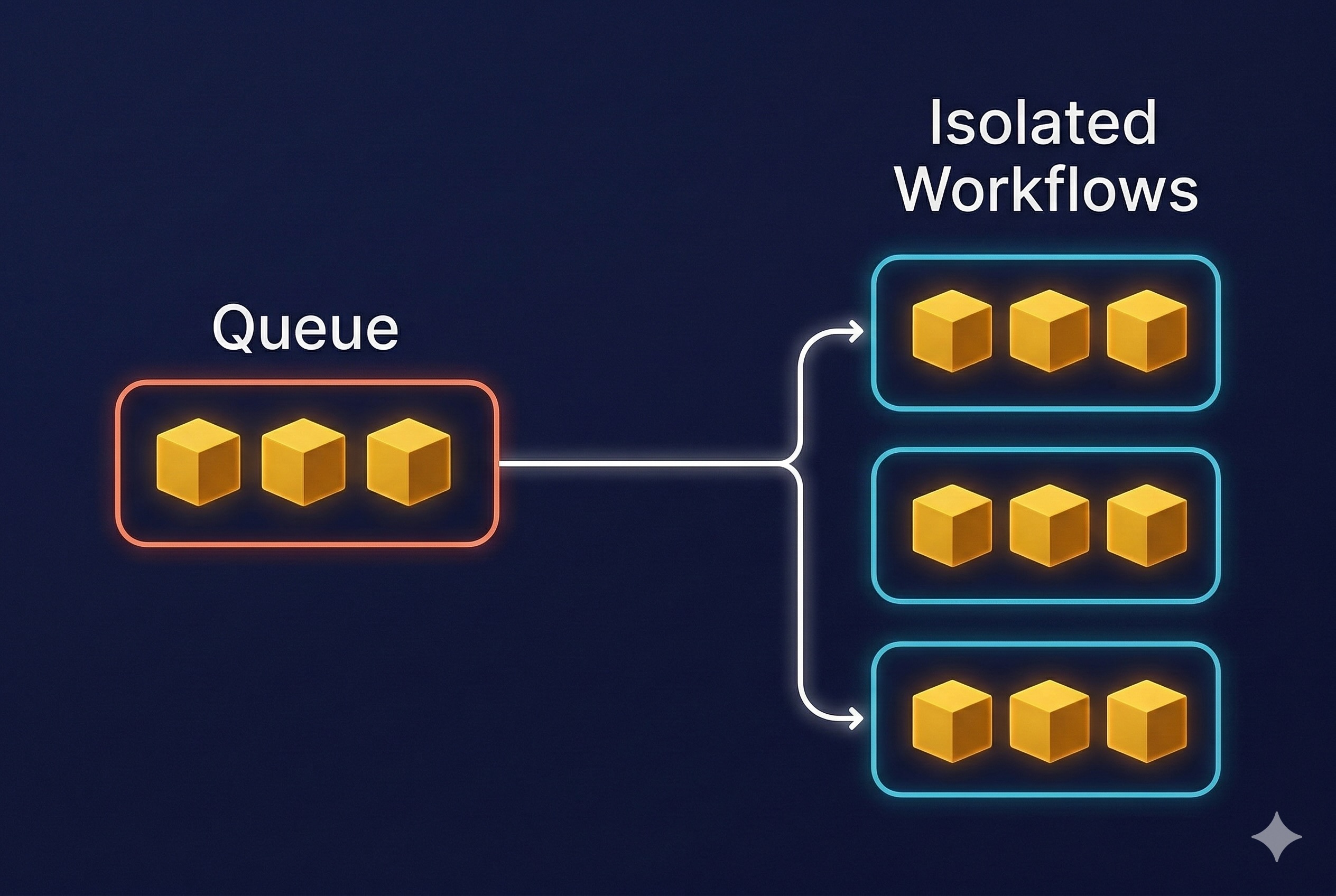
Instead of treating a queue as one massive FIFO (First-In, First-Out) lane, the Groups feature transforms it into a multi-lane highway. Each lane, or group, can have its own traffic rules, ensuring that a traffic jam in one lane does not affect the flow in others.
Core Capabilities of the Group-Based Approach
Assigning a groupId to a job unlocks a powerful set of controls that are applied independently to all jobs sharing that same ID. This is the key to achieving true workload isolation.
Workload Isolation: By combining concurrency and rate-limiting, the “noisy neighbor” problem is effectively eliminated. A sudden burst of millions of jobs from a single tenant will be throttled according to its group rules, ensuring that other tenants continue to receive their fair share of processing resources and maintain consistent performance.
- Concurrency Control per Group: You can specify the maximum number of jobs that can be processed concurrently for a specific group.
- Use Case: In a video processing application, you can limit free-tier users (
groupId: 'free-tier') to processing only 2 videos simultaneously, while premium users (groupId: 'premium-tier-123') can process 10 videos at once, all within the same physical queue.
- Use Case: In a video processing application, you can limit free-tier users (
- Rate Limiting per Group: You can define a maximum number of jobs that can be processed over a given time period for each group.
- Use Case: An email service can prevent spam by limiting a specific user (
groupId: 'user-456') to sending 100 emails per hour, without affecting the throughput of other users.
- Use Case: An email service can prevent spam by limiting a specific user (
- Workload Isolation: By combining concurrency and rate-limiting, the “noisy neighbor” problem is effectively eliminated. A sudden burst of millions of jobs from a single tenant will be throttled according to its group rules, ensuring that other tenants continue to receive their fair share of processing resources and maintain consistent performance.
Example: Setting and Updating Rate Limits per Group
BullMQ-Pro allows you to set and update rate limits for each group at any time—even while the system is running. This enables you to respond to changing workloads or upgrade customer plans without downtime or queue reconfiguration.
const { Queue } = require('bullmq-pro');
const queue = new Queue('analytics-queue', { connection });

// Add a job for a specific tenant group
queue.add('process-data', { ... }, { groupId: 'tenant-A' });

// Set initial rate limits for the group
queue.setGroupRateLimit('tenant-A', { max: 100, duration: 3600 }); // 100 jobs/hour

// Update limits at runtime as needed
queue.setGroupRateLimit('tenant-A', { max: 200, duration: 3600 }); // 200 jobs/hour
This flexibility ensures each tenant or group receives the right level of resources, and you can adjust these limits on the fly to match business needs or operational realities.
Practical Application: A Multi-Tenant SaaS Architecture
Consider a multi-tenant SaaS platform that provides data analytics services. Each tenant has a unique ID.
- Without Groups: All data processing jobs from all tenants are pushed to a single
analytics-queue. If Tenant-A (an enterprise client) uploads a massive dataset, it floods the queue. Consequently, Tenant-B (a small business) experiences significant delays in processing its small, urgent report. - With BullMQ-Pro Groups: Every job is submitted with the tenant’s ID as the
groupId:
add('process-data', { ... }, { groupId: 'tenant-A' })
add('process-data', { ... }, { groupId: 'tenant-B' })
Now, the system can be configured with specific rules for each tenant based on their subscription level, guaranteeing Quality of Service (QoS) and fair resource allocation for everyone.
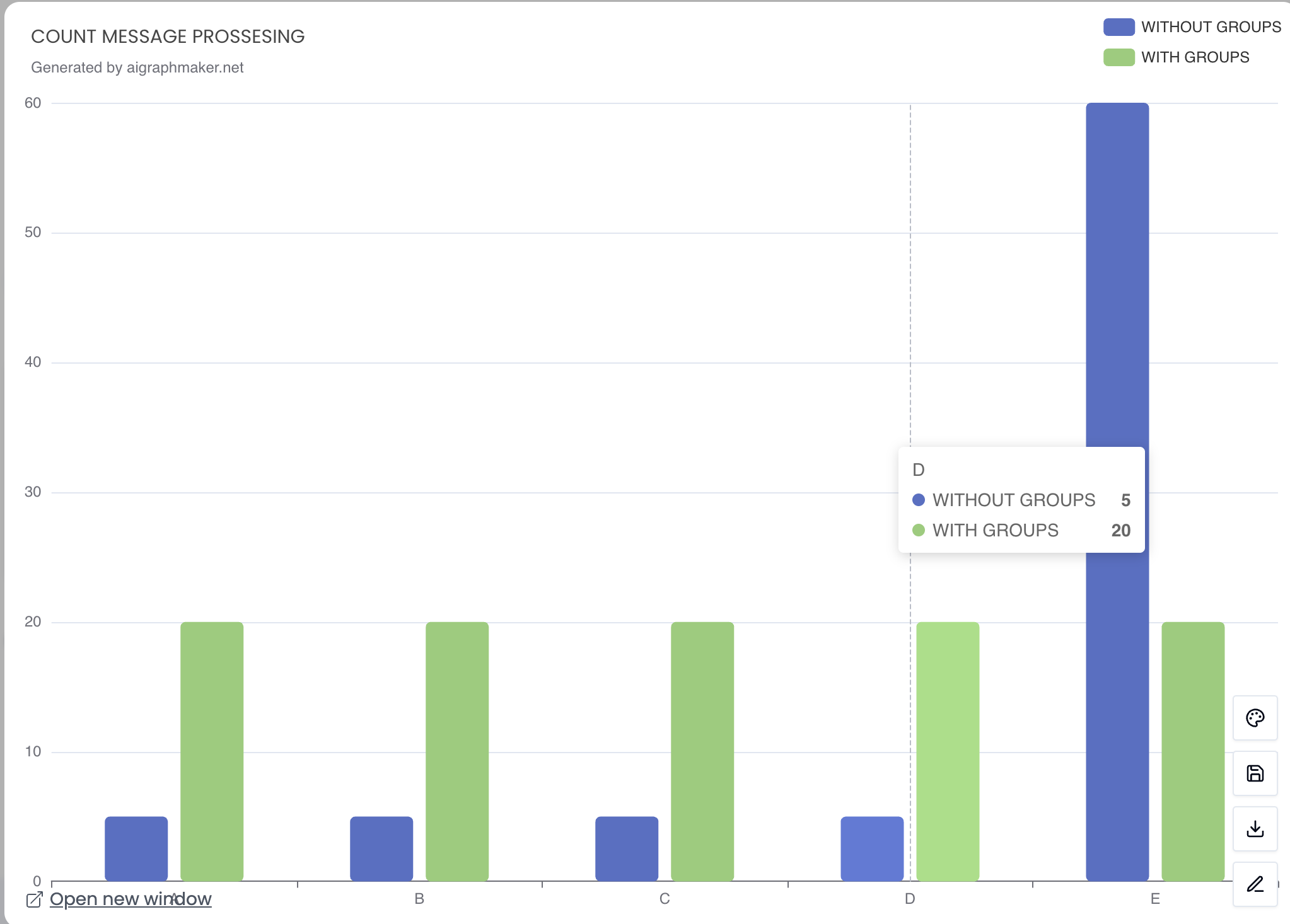
The graph compares the number of messages processed (scanned) across five projects (A-E) under two different processing methods: Without Groups (Blue) and With Groups (Green).
The core insight is that “Groups” introduces fairness and stability to the scanning process.
| Method | Advantage (Brief) | Disadvantage (Brief) |
| Processing With Groups | Fairness and Balance: Ensures each project receives an allocated share, preventing any single dominant project from monopolizing scanning resources. | Total Throughput Limitation: If there are free resources, active projects cannot utilize them fully beyond their assigned quota (limiting maximum system output). |
| Processing Without Groups | Maximal Utilization (for one project): Allows a high-load project (like Project E) to instantly utilize the full available processing power, speeding up its message handling. | Impact on Other Projects: Leads to starvation and significant delays in message processing for quieter or less aggressive projects. |
How a Single Heavy Project Can Derail Queue Performance (When Grouping Doesn’t Exist)
In a shared-worker model, all projects rely on the same pool of consumers to execute their tasks. While this design is simple to operate, it exposes a critical weakness: one resource-hungry project can dominate the entire system. These challenges become even more critical when managing a Stream-powered web scraping data pipeline at scale, where high-volume workloads require reliable orchestration, predictable throughput, and continuous data flow. Without tenant-level grouping or isolation, a single high-volume workload can absorb most of the available processing power, triggering cascading delays and unpredictable performance across the board.
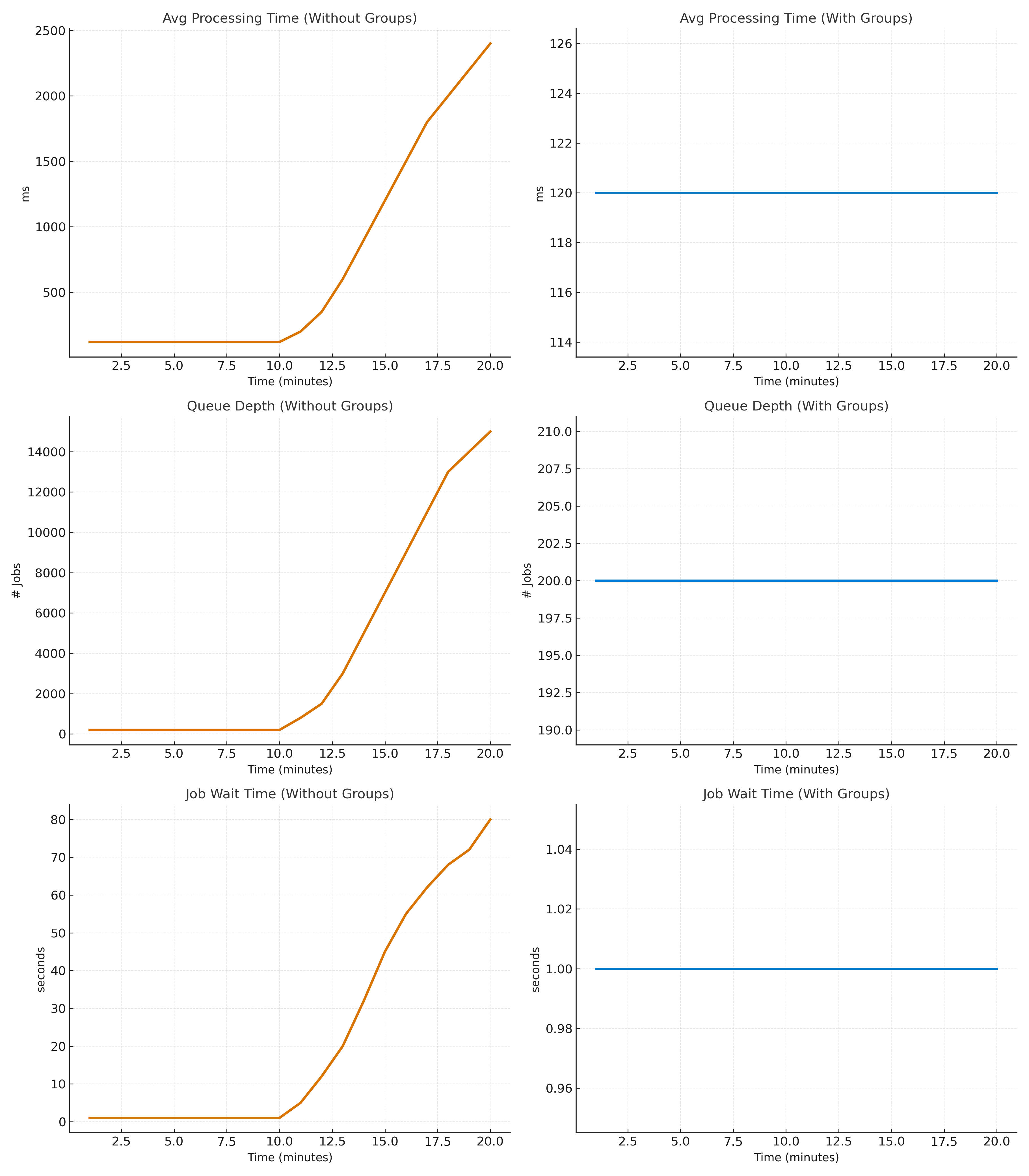
This isn’t a theoretical concern – it’s a measurable, system-wide disruption. The following visuals illustrate exactly how dramatically a single “heavy” project can impact a shared queue.
1. Average Processing Time Skyrockets
The moment Project E begins flooding the queue with thousands of computationally expensive jobs, the system’s average processing time surges from a healthy ~120 ms to more than 2,000 ms. Every project – regardless of workload type or priority – feels this slowdown. This is the classic “noisy neighbor” scenario in action.
2. Queue Depth Grows Out of Control
A queue that typically stabilizes around 200 jobs suddenly balloons to over 13,000 jobs. This explosive growth isn’t just a number – it represents a backlog that can take minutes or even hours to recover from, undermining throughput, responsiveness, and operational SLAs.
3. Job Wait Time Soars
Lightweight, latency-sensitive jobs that previously waited ~1 second for execution now sit idle for 20–70 seconds. Workers are fully saturated handling Project E’s heavy tasks, leaving everything else waiting in line. For customer-facing systems, this kind of delay isn’t just inconvenient – it’s unacceptable.
This is the reality of operating a shared queue without intelligent grouping or resource isolation: one tenant’s surge becomes everyone’s outage.
Why Groups Fix This
By isolating projects into groups, each project receives its own worker allocation. This prevents a heavy project from blocking others, ensures fairness, and stabilizes SLA across the system
Conclusion: Take Control of Fair, Predictable Multi-Tenant Processing
Multi-tenant systems don’t have to run on hope and good intentions. You don’t need to wait for the next “noisy neighbor” surge to slow down your pipeline or jeopardize an SLA. With BullMQ-Pro Groups, you can architect fairness into the foundation of your distributed job system.
Start by assigning a groupId to each job – whether by tenant, client, or workload type – and apply per-group concurrency and rate limits that reflect real business priorities. Within hours, you’ll see the impact: smoother latency curves, balanced resource usage, and an end to small tenants being overshadowed by heavy hitters.
As demand shifts, simply adjust group configurations on the fly. Watch as your system dynamically redistributes processing power and keeps performance steady – even during spikes. BullMQ-Pro Groups give you the tools to deliver predictable throughput, enforce SLAs with confidence, and turn your job queue into a true differentiator for your platform.
Ready to level up your workload orchestration? Add your first groupId – and feel the difference immediately.
Frequently Asked Questions About BullMQ-Pro Groups
Learn how BullMQ-Pro Groups help multi-tenant systems isolate workloads, control concurrency and rate limits, prevent noisy-neighbor issues, and maintain predictable performance within a shared queue.
What problem do BullMQ-Pro Groups solve in multi-tenant systems?
BullMQ-Pro Groups address the “noisy neighbor” problem that occurs when multiple tenants share the same processing resources. Without workload isolation, a high-volume tenant can consume available worker capacity, causing delays and unpredictable performance for everyone else. Groups isolate workloads within a shared queue so each tenant receives a fair share of processing resources.
How do BullMQ-Pro Groups provide workload isolation within a single queue?
Each job is assigned a groupId, allowing jobs within the same physical queue to be logically separated into groups. Concurrency and rate-limiting rules can then be applied independently to each group, preventing one workload from monopolizing shared processing resources.
What is the difference between per-group concurrency control and rate limiting?
Concurrency control determines how many jobs from a specific group can run simultaneously, while rate limiting controls how many jobs that group can process within a defined period. Used together, they provide granular control over how processing capacity is distributed between tenants or workloads.
What happens when a high-volume project shares a queue without grouping?
The article demonstrates how one heavy project can significantly affect the entire queue. Average processing time increased from approximately 120 ms to more than 2,000 ms, queue depth grew from around 200 to over 13,000 jobs, and job wait times increased from roughly 1 second to 20–70 seconds.
Can BullMQ-Pro Group limits be changed while the system is running?
Yes. BullMQ-Pro allows rate limits for individual groups to be updated at runtime without downtime or queue reconfiguration. This makes it possible to adapt resource allocation as workloads change or when customers move between service levels.