Why Web Scrapers Get Blocked: CAPTCHAs, 403s, Fingerprinting & Rate Limits

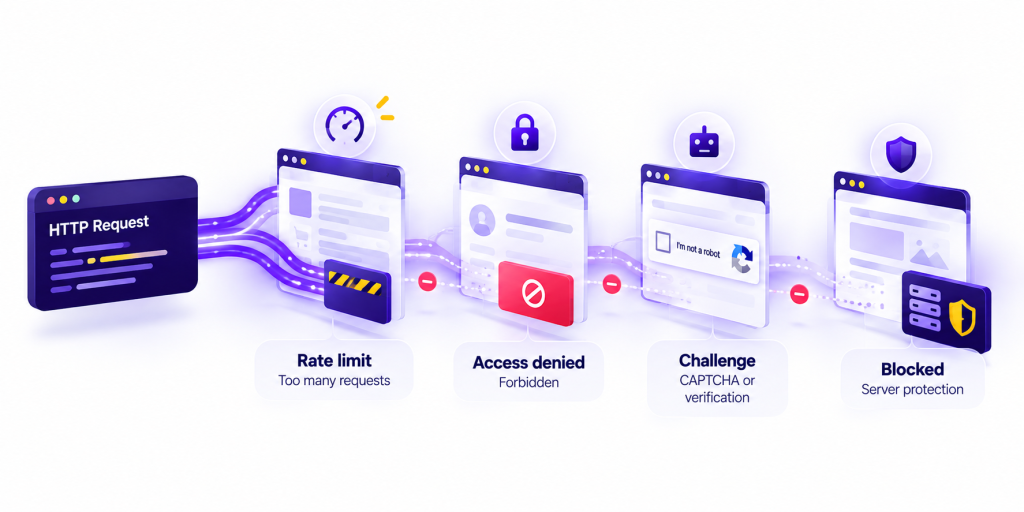
When a scraper stops returning data, you rarely get an explanation. You get a 403, a 429, a CAPTCHA served as HTTP 200, or an empty shell of the page you expected. Those are symptoms. They are not the cause.
This article is about why web scrapers get blocked: what sites are protecting, what blocking looks like from the client, and which causes tend to produce those symptoms: CAPTCHA, 403, rate limits, fingerprinting, IP reputation, request patterns. Not a guide to staying unblocked, and not a deep dive into how anti-bot products score traffic. At volume the same symptom can come from different causes, and those causes stack. If you’re looking for the operational side of the problem, our guide to web scraping without getting blocked focuses on designing scraping systems that reduce blocking and maintain reliable access over time.
Why Sites Treat Automated Traffic as a Risk
Sites do not block scrapers because HTTP clients are hostile. They block traffic that is expensive, distorting, or hard to tell apart from abuse.
Automated requests are cheap to send and expensive to serve. A person who opens a product page also loads assets and then leaves. A scraper can hit the same route thousands of times with no rendering cost on its side and a full origin hit on the site’s. At the edge that looks like a capacity problem before it looks like a data problem.
Integrity is the other driver. Inventory, prices, rankings, and account-gated pages are commercial surfaces. Operators also see scraping-shaped traffic next to credential stuffing and inventory hoarding, not because those are the same activity, but because the patterns rhyme: high parallelism, little session variety, datacenter IPs, no human pacing.
Protection is usually a stack: WAF rules, CDN quotas, IP reputation, bot management, CAPTCHA, application limits, not one “scraper detector.” Web scraping blocked behind a 403 is often the visible end of that stack.
What Blocking Looks Like From the Scraper
Blocking almost never arrives as a labeled X-Blocked-Reason header. You see a small set of shapes:
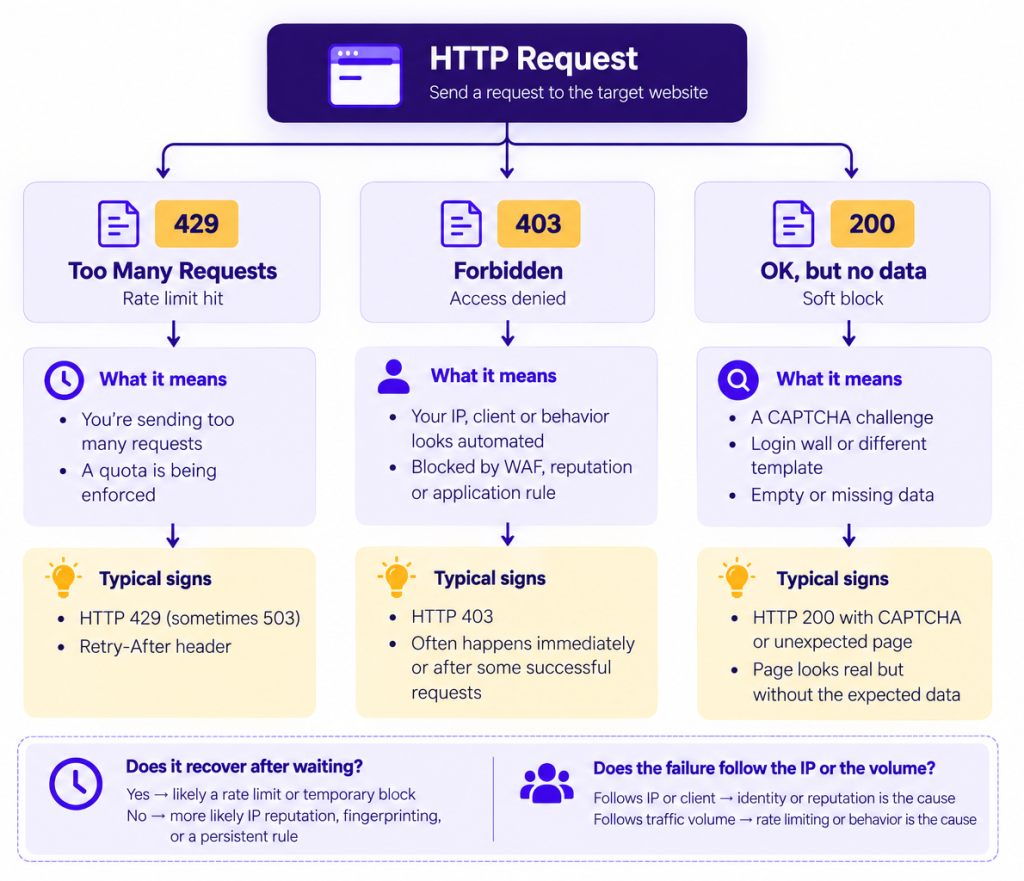
Hard status codes. 403 Forbidden, 429 Too Many Requests, sometimes 401, 503, or a vendor-specific code. The body may be a CDN error page, a one-line “Access denied,” or empty.
Soft blocks. HTTP 200 with a CAPTCHA, an interstitial, a login wall, or a page that looks like the site but is missing the data (empty grid, “enable JavaScript,” challenge iframe). If you only assert on status code, you will miss these.
Inconsistency. The first twenty requests succeed and the next twenty fail. /health works and /api/search does not. One IP lasts an hour and then does not. That inconsistency is a symptom: different layers are reacting to different parts of the request.
CAPTCHA: A Challenge, Not a Verdict
A CAPTCHA is not a ban. It is a challenge: the site wants a signal it does not currently have. In CAPTCHA web scraping incidents that distinction matters. Teams treat every puzzle as “we got blocked,” when some are probes after a soft score and others are the last step after the score already failed.
What tends to bring a CAPTCHA up:
- The IP sits in a range already associated with automation (cloud, known proxy networks, previously abused pools).
- The session is new and already loud: many URLs, no referrer chain, no cookies a real visit would have accumulated.
- The client does not match a normal browser visit (see fingerprinting below).
- An earlier request from the same IP or cookie jar already tripped a rule. The CAPTCHA is the follow-up, not the first event.
The symptom is often a 200 with HTML you did not expect: a vendor iframe or a “verify you are human” page. Sometimes it is a 403 whose body is that same page. If your parser looks for a selector that only exists on the real page, you will log “empty result,” not “CAPTCHA,” and the cause stays invisible.
It rarely appears after one quiet request from a clean consumer IP. It appears because something already looked automated.
A pattern we’ve seen in practice: a collection job can appear completely healthy from the HTTP layer while the actual data has already disappeared. Requests continue returning 200, latency looks normal, and nothing obvious fails, but the expected product grid has been replaced by a challenge page. If monitoring stops at status codes, this can go unnoticed until someone checks the output and finds that a large part of the dataset is empty.
HTTP 403: Access Denied, Many Possible Reasons
403 Forbidden is the most overloaded status in scraping. In 403 web scraping failures it usually does not mean “this path requires a login.” 401 is closer to that. 403 on a public page more often means: this request is not allowed to proceed, for a reason the origin will not spell out.
Causes that surface as 403:
- Edge / WAF policy: datacenter ASN, impossible User-Agent, blocked country, a header set that only bots send.
- Bot score: a management layer assigned a low “human” score. You never see the score. You see 403, or 403 plus a challenge page.
- Application ACL: invalid session, geo fence, referrer check, “this API is not for this kind of client.”
- Reputation already spent: the IP or client was flagged earlier. This 403 is the persistent result, not the first decision.
A 403 on the first request points at identity: IP reputation, ASN, client mismatch, or a blanket WAF rule. A 403 after thousands of successful fetches points at accumulation: rate, pattern, or a session that started looking automated over time. Read the body. A CDN Access Denied, the site’s own template, and a 403 that contains a CAPTCHA are different layers.
One useful debugging pattern is to look at when the 403 starts. We’ve seen cases where a client receives a 403 immediately, even at extremely low request rates, and others where the same symptom appears only after sustained traffic. They look identical in the logs, but they point in very different directions. The first makes us look at identity and reputation; the second makes rate, session history, and accumulated behavior much more relevant.
HTTP 429 and Rate Limiting
Rate limiting is the cause people reach for first, and sometimes they are right. A web scraping rate limit is a quota: too many requests per IP, token, route, or window.
The honest symptom is 429 Too Many Requests. Well-behaved implementations add Retry-After. Bodies vary: JSON, a CDN sorry-page, or empty. Some stacks use 503 or even 403 for the same quota. If you only grep for 429, you will under-count rate limits.
Rate limits exist to protect origin CPU from bursts and to slow a noisy client without banning it forever. They are usually temporary and quota-shaped: wait, or drop concurrency, and the same client often starts succeeding again.
The common mistake is calling every stall after a burst a rate limit. Some stalls are 429s. Some are 403s and CAPTCHAs because the burst also fed IP reputation and fingerprinting. The rate was a contributing cause. It was not the only one.
A common mistake we’ve seen is reacting to every post-burst failure by simply reducing the request rate. Sometimes that works. Other times the scraper continues receiving 403s or challenges long after traffic has dropped. That is usually the clue that rate was only one part of the problem. Once multiple protection layers are involved, changing a single variable may not restore the previous behavior.
IP Reputation: Blocked Before You Were “Too Fast”
IP-based controls do not wait for a QPS budget. They ask whether this address has been a problem before, or whether it looks like the kind of address that usually is.
- Datacenter and cloud ranges. Plenty of legitimate traffic comes from AWS, GCP, and Azure. Plenty of scraping does too. Many sites treat those ASNs as higher risk by default.
- Shared and recycled IPs. Proxy and VPN pools are dense. An address that was clean this morning may have been used against the same target last week. You inherit that history.
- Blocklists. Some 403s are not about your scraper. They are about an IP that appeared in an abuse list, a previous incident, or a neighboring host on the same subnet.
The symptom is often failure early: CAPTCHA or 403 on request #1, even at one request per minute. A classic rate limit needs volume inside a window. If slowing down does nothing and the failures follow the IP (or the /24) rather than a particular URL, reputation is a better explanation than “we were too fast.”
Fingerprinting: When the Client Looks Automated
Fingerprinting, here, is a cause class, not a tour of detection internals. The site has more than an IP and a URL. It can see how the client presents itself: headers, protocol behavior, and, if a page ran, whether the environment is consistent with a normal browser. The practical cause is simple: the client does not look like the traffic the site is willing to serve.
A library default User-Agent, headers no current browser sends, an environment that disagrees with the advertised identity, a session that is a new person every request or the same person a hundred thousand times: any of these can be why a request is refused. How vendors score that mismatch is a different article.
Web scraping fingerprinting problems are easy to mislabel as rate limits. The scraper works for a few requests, long enough to look like “we were fine until we sped up,” then 403 or CAPTCHA appears. The timing looks like a quota. The status is often not 429, and a pause does not restore a clean 200 with real HTML. A true rate limit usually will.
Request Patterns, Frequency, and Behavior
Even with a clean IP and a plausible client, what you do can be the cause.
People move in small chains: search, a click, a product page. Scrapers move for coverage: tens of thousands of IDs, tight concurrency, no assets, no idle time, the same path template, clocks that look like cron.
- Frequency: too many requests per second from one IP, token, or session. This overlaps rate limiting, and often is rate limiting.
- Parallelism: many connections, many URLs, no think time.
- Path shape: only JSON endpoints, never the document that would have set cookies; only /product/{id}, never /; always the same order and the same hours.
- Session behavior: no cookies, cookies reset every request, or one jar reused across what should be independent visitors.
The symptom is mixed: 429 if the site is being polite, 403 or CAPTCHA if a bot layer reads the pattern as automation, or a soft 200 with thinner pages. At low volume a weird pattern might never matter. At high volume it becomes obvious.
Temporary Block, Rate Limit, or Something That Sticks
Not every failure is the same kind of block. Mixing them up is how postmortems go in circles.
A useful question after any incident: if we did nothing for 30 minutes, would this recover? If yes, you were likely in rate-limit or cooldown territory. If no, you are looking at reputation, fingerprinting, or a durable WAF rule, causes that do not expire with a window.
Blocking Is Usually More Than One Signal
Edge and bot stacks almost never decide on a single bit. They combine who you appear to be (IP, ASN, history), what you appear to be (client, headers), and what you are doing (rate, paths, session).
A 403 after a burst from a cloud IP with a default library User-Agent has three contributing causes. You cannot see the weights. You can see that the symptom is one response and the causes are plural. “It died after 40 requests, so it was a rate limit” picks the familiar cause and ignores the others that were already accumulating. The 40th request is when a threshold crossed. It is not when the causes started. For teams that need to separate access challenges from the rest of their collection infrastructure, an Unblocker API can handle much of the access layer without requiring every blocking signal to be managed independently.
Why This Gets Worse at Scale
A job that fetches 200 pages a day can look like a clumsy user. A job that fetches two million cannot.
At scale you sample more of the protection surface: more IPs on more blocklists, more inconsistent clients, more cron-shaped jobs. Failures correlate. A 429 cascade retries, raises QPS, trips a second layer, issues CAPTCHAs. Symptoms multiply even if the original cause was a single quota.
Reputation becomes a fleet problem: one noisy job taxes everyone behind the same proxy pool or NAT. The incident mix (200-CAPTCHA, 403, 429, timeouts) looks random unless you group by status, body, whether a pause recovers, and whether it followed IP vs client. The causes did not change. There are just enough of them, at once, that they stop being rare.
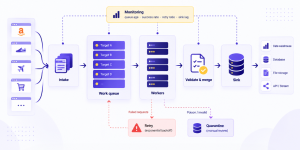
At scale, we’ve also seen failures create their own feedback loop. A target starts returning more 429s, failed requests enter the retry path, and the retries add even more traffic to an already stressed target. Soon the incident no longer looks like a clean rate-limit event: some requests return 429, others 403, some receive challenges, and others time out. Looking at each response independently makes the incident appear random. Looking at the sequence often tells a much clearer story. At that point, blocking becomes part of a broader reliability problem. Our guide to web scraping at scale explores how retries, queues, rate limits, throughput, and failure handling interact when collecting millions of pages.
Takeaways
- Why web scrapers get blocked is usually several contributing causes. The HTTP response is a symptom of a stack defending capacity, integrity, and abuse-shaped traffic.
- CAPTCHA is a challenge after something already looked automated, often a 200. 403 is overloaded: first-request failures point at identity, late ones at accumulation. 429 is the clean symptom of a web scraping rate limit.
- IP reputation can block you before you are too fast. Fingerprinting means the client did not look like welcome traffic, and is easy to confuse with a rate limit. Request patterns become causes on their own at volume.
- Temporary vs persistent is a different question from which layer fired. If waiting would not have recovered, you are not in a quota window. At scale the same causes stack across a fleet.
Name the symptom (status, body, recovery, the identity it followed), then name plausible causes in combination: not how to get through, but why you were stopped.
Questions About Why Web Scrapers Get Blocked
Understanding CAPTCHAs, HTTP 403 and 429 errors, fingerprinting, IP reputation, and blocking behavior at scale.
Why do websites block web scrapers?
Websites block automated traffic to protect their infrastructure, maintain service availability, and prevent unwanted activity. Blocking decisions can involve multiple signals, including request frequency, IP reputation, client characteristics, and session behavior. A block is often the result of several signals rather than a single suspicious request.
What is the difference between HTTP 403 and HTTP 429 in web scraping?
HTTP 403 indicates that access has been denied, potentially because of IP reputation, client characteristics, security rules, or accumulated behavior. HTTP 429 typically indicates that a request rate or quota limit has been exceeded. While rate limits may resolve after waiting or reducing traffic, a 403 response can reflect restrictions that persist longer. Neither status code alone identifies every underlying cause.
Can a web scraper be blocked even when it receives an HTTP 200 response?
Yes. Some websites use soft or silent blocking, returning HTTP 200 while serving a CAPTCHA, an empty page, or an unexpected HTML template instead of the requested content. This can make a scraper appear successful even when no usable data is collected. Monitoring response codes alone is therefore insufficient to identify every blocking event.
How do IP reputation and browser fingerprinting contribute to web scraping blocks?
IP reputation can influence whether a request is accepted before the scraper generates significant traffic. Datacenter IP ranges, shared addresses, or previously flagged networks may encounter restrictions immediately. Browser fingerprinting adds another layer by evaluating client characteristics and consistency. Unusual headers, protocol behavior, or browser characteristics can contribute to blocking decisions.
Why do web scraping blocks become more frequent at scale?
As scraping volume increases, request frequency, concurrency, and repeated access patterns become more visible to website protection systems. Rate limits may trigger retries that increase traffic further, potentially causing additional challenges, 403 responses, or timeouts. At scale, different blocking mechanisms can interact, making it important to distinguish temporary throttling from persistent restrictions and silent failures.